
Welcome to H-E-B Tennis Center

Book Courts Now
Learn the steps to booking courts below.

Step 2: Enter Account Information
Once you have selected your organization, you will be prompted to input your contact information.

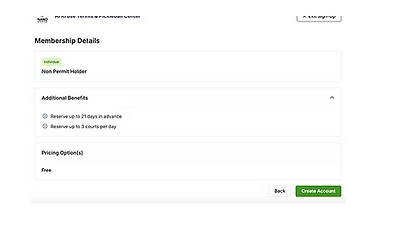
Step 3: Select Non-Permit Holder Membership
Once you have inputted your contact information you will be prompted to select a membership to begin reserving. Select Non Permit Holder (FREE). If interested in another permit, please come by the facility to discuss.

Step 4: Select Create Account
Review your details, and then select Create Account.
Step 5: Select Communication Preferences
Finalize your account by selecting a text message preference from the options given.

Step 6: Reserve a Court
Once your account is made you will be automatically logged in. Choose your actions in the top bar. Select Reservations > Book a Court.

Step 7: Select a Court
Once you have clicked Reservations > Book a Court it will take you to the full list of available times, dates, and courts. You can select East or West, or All Courts.
Step 8: Finalize Reservation
Once you select a time, you will have a pop-up that will allow you to select the available court for that timeframe, add players, add a ball machine if available, and once you have all information filled click Save. Once saved you will get a confirmation pop-up that says Pending Approval. This just means it is reserved and Payment will be done at the facility.

